
 nilsandClaude Opus 5.5
6563b2c4e8
Before a now-playing display, find where the head unit tells what is
playing, read only: the players Android reports, the active media
sessions, and every media browser service with its song, CarPlay's
(com.allgo.remoteui.mediabrowserservice) among them. The report is saved
and sent like a signal recording (shared SignalRecorder.saveCopies).
Also the findings of the first two recordings from the server.

Co-Authored-By: Claude Opus 5.5 <noreply@anthropic.com>
Claude-Session: https://claude.ai/code/session_01LhzAVaUyqcw5PkGjz4mWW6
Nils' MG4
An Android Automotive app for the MG4 (SAIC eh32) head unit, plus a small server: the car sends its telemetry to my own server at car.k8s.stinnesbeck.com, which stores it in InfluxDB 2 for the Grafana dashboards, and its live data straight to A Better Route Planner.
No OBD dongle and no phone in the loop: the app runs on the head unit and reads the car's own APIs.
- Repository: https://git.stinnesbeck.com/nils/mg4
- Fork of fatihdonmezdev/FatihsMG4, itself built on malys' EVABRPUploader and Leon Kernan's
ABRP_Uploader. - What changed and what is still to do:
SPECS.md.
⚠️ No warranty, no liability. This software is provided "as is" and runs on a vehicle. Installing it is your decision and your risk; see
DISCLAIMER.md. Not affiliated with SAIC, MG Motor or Iternio. MG and MG4 are third-party marks used only to identify compatibility.
Licence. MIT, like Leon Kernan's original
ABRP_Uploaderand the forks in between — except the bundledEVHardware/library, which is PolyForm Noncommercial, so the built app may only be used and shared non-commercially. SeeLICENSE.md.
Contents
- Screenshots
- Overview styles (separate page)
- How it fits together
- The app
- Install on the car
- Setup
- Building
- Server and dashboards
- Project layout
- Project documents
- Credits
Screenshots
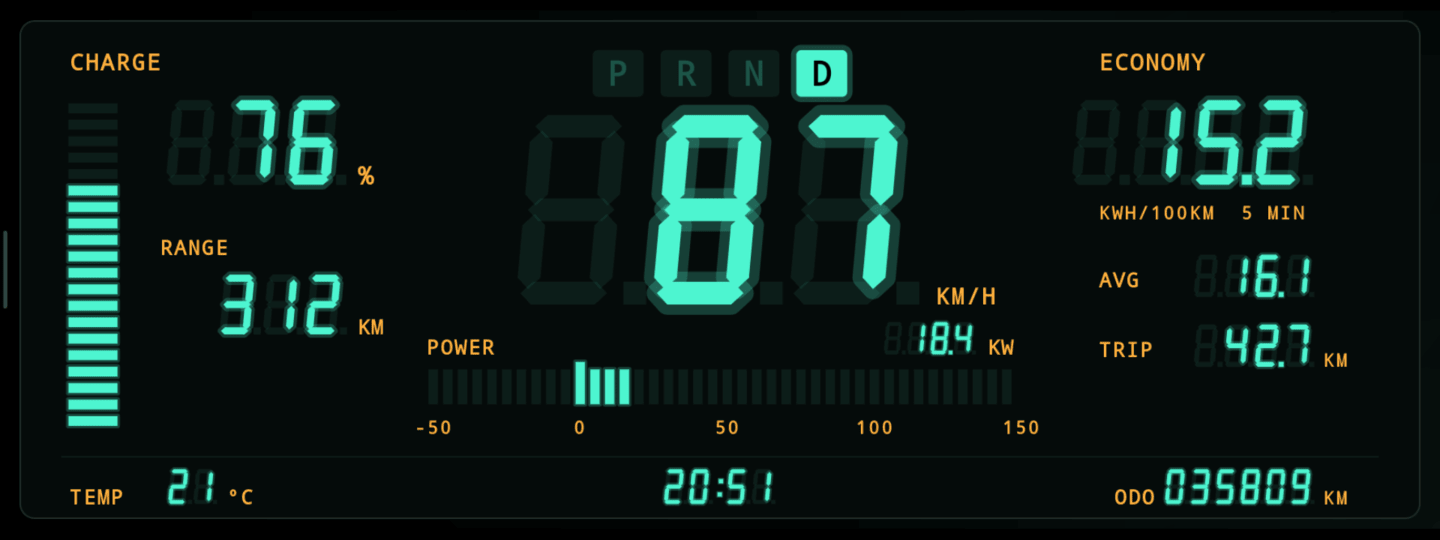
Overview styles: the Overview comes in eighteen looks, from an 80s fluorescent display to a starship console, a watch face, a neon grid (also over a map of the roads round the car), a time machine, a fantasy game, a helmet display and a strategy game. THEMES.md shows each one, with and without the navigation, and what inspired it.
The tabs of version 2.35.2 in the car's app window (1778×640 dp next to the MG4's own sidebar), full screen, on the Android 9 emulator right after installing. There is no vehicle there, so every live value shows as a dash. Every tab fits the window without scrolling.

 |
 |
 |
 |
 |
 |
How it fits together
car ──live telemetry───▶ car.k8s.stinnesbeck.com (Go)
 │  ──daily chunks─────▶          │
 │  ──charging sessions▶          ▼
 │                            InfluxDB 2 ◀── Grafana
 └──live telemetry─────▶ ABRP
The car sends live data to ABRP itself, with the ABRP credentials set on the Live data tab, so ABRP and the server do not depend on each other. The server stores, relays the app's updates from the forge and serves the roads for the Grid's map (OpenStreetMap, through OpenFreeMap). The car authenticates with the server using a token of its own, obtained by pairing with a phone (below).
The app
| Tab | What it shows |
|---|---|
| Overview | Battery, range, power and speed; range, usage and energy since start; 5-minute averages of range, usage, power and speed; vehicle info (odometer, lease allowance, climate setpoint) and tyre pressures. Read five times a second. Looks to choose from in Settings → Overview style: Tiles, Gauges, Cockpit, Retro, Futuristic, Sci-fi, Cartoon, MG, Minimal, Terminal, Nixie tubes, Chronograph, Grid, Grid with map, Time circuits, Quest, Visor and Empire (THEMES.md shows them all). A style with its own colours (Sci-fi, Cartoon, Nixie tubes, Time circuits, Quest, Empire, and Retro, Terminal, Grid and Visor with "Original") colours the whole app to match, e.g. turquoise for Retro. Grid with map lays the roads round the car on the Grid's floor: the app asks the car's server for the map tile it is in (not its position), the server fetches only that tile from OpenFreeMap's OpenStreetMap vector tiles and keeps it, and the GPS runs for it only while that style is on screen. The small button next to the MG4 logo in the navigation hides the navigation for a full-width Overview; swipe in from the left edge (a faint handle marks it) to bring it back; with Settings → Full screen off, the car's own sidebar sits at that edge, so tap the small tab at the left edge (›) instead. Pages change only by the navigation, not by swiping sideways |
| Consumption | Lifetime, last 7 and 30 days, Trip A and B (distance, energy, average consumption and speed, SOC change), and a daily log of the last four months |
| Charging | The current session (SOC, voltage, current, power, energy into the battery and from the grid, time, cost) and its SOC/power curve |
| Live data | Live data on/off, ABRP credentials for sending directly from the car, upload frequency |
| Server | Server URL, pairing by QR code, ingest token, installation ID, config import |
| Settings | Full screen, voice key, Overview style and accent colour, tyre pressure unit; drive mode (Eco, Normal, Sport, Snow, Custom: changes only in P at a standstill; the highlighted one is what the car reports; with "Set at start" the last confirmed choice is set again when the car starts, while it is still in P); battery (manual SoH, usable capacity) and charging price; entry on the phone; version, update check, install from USB stick, About |
| Logs | Signal recorder (records every value the head unit offers for 3 minutes, listens to the driver-assistance values for every change they report, and lists what changed, to find where the car publishes something; sent to your server, and saved to a USB stick too), music-sources check (where the head unit tells what is playing, CarPlay included; read only), update log (every install step), upload log |
- Opening the app: the MG4 launcher does not list third-party apps. Double-press the voice key on the steering wheel and the app comes to the front (switch on the Settings tab, on by default).
- Full screen: hides SAIC's top and bottom bars while the app is open; a swipe from the edge shows them briefly (Settings tab, on by default).
- Live telemetry: while driving or charging, at the upload frequency set on the Live data tab (15 s to 5 min, every minute by default; every 15 s below a low battery threshold, if switched on); parked and unplugged, once every 15 minutes. A value the car cannot read is left out, never sent as zero, so ABRP is never told the battery is empty because a read failed.
- Read-only, with one exception: the app writes no vehicle setting except the drive mode, and that only in P at a standstill, when you tap it on the Settings tab or, with "Set at start", once when the car starts. What it shows is what the car reports back.
Signals the MG4 does not publish (battery, cabin and outside temperature, pack energy and
capacity) are listed in SPECS.md.
Install on the car
The car build (NilsMG4-unstable-<version>.apk) runs with the system UID and is signed with the
AOSP test platform key that the MG4 head unit uses. It installs next to the old FatihsMG4 app
(package com.stinnesbeck.nilsmg4.unstable), not over it.
Without adb, through the head unit's hidden file manager:
- Copy the APK to a USB stick and plug it in.
- Open Bluetooth Settings and select the car name.
- Long-press the comma key until the keyboard settings appear.
- Android Keyboard Settings → Languages, then search for
filein the box at the top. - That opens the Files app: open the USB stick, tap the APK and install.
With adb:
adb push build/car/NilsMG4-unstable-<version>.apk /data/local/tmp/update.apk
adb shell "pm install -r -f -d -t /data/local/tmp/update.apk"
⚠️ Do this parked, and only with an APK you trust. See DISCLAIMER.md.
After that first install, the app updates itself, two ways (details in OTA.md):
- Over the air: publish a build with
publish-car, then press Check for updates on the Settings tab. The car fetches it through your car server, which relays the forge's release, so the car never holds a forge credential. - From a USB stick: copy
NilsMG4-unstable-<version>.apkand its.sha256frombuild/car/to the stick's top folder and press Install from USB stick on the Settings tab.
Either way the app checks the SHA-256, the package and the signature before installing.
Setup
- Open the app (voice key double press, or "Open" right after installing).
- On the Server tab the URL is already
https://car.k8s.stinnesbeck.com. - Tap Pair with phone. Scan the QR code with a phone (or open the address shown and enter the code), and approve with the server's approval password. The car receives its token.
- On the Live data tab, turn live data on. The service starts with the car from then on.
- Enter your ABRP API key and user token on the same tab, so the car sends live data to ABRP.
On your phone
Once the car is paired, Enter on phone (Live data tab, and Settings → On your phone) shows a QR code. It opens a form on your server where you type the ABRP API key and user token, the charging price and the usable capacity, and send them with the approval password. The car collects them within a few seconds and saves them through the same checks as the fields on screen. The server only passes them on: they are held in memory until the car has them (at most ten minutes), never stored or logged.
Config file
Instead of typing, put the settings in a text file and tap Import file on the Server tab. The head unit has no file picker, so copy the file to
Android/data/com.stinnesbeck.nilsmg4.unstable/files/
on the USB stick or the internal storage. The app scans that folder on every mounted volume and
takes the first file that parses. Format, one key = value per line, # for comments; keys left
out keep their current value:
server_url      = https://car.k8s.stinnesbeck.com
token           = the server's INGEST_TOKEN (not needed after pairing)
installation_id = only to carry over history from an install older than 2.9.0
interval_sec    = 60      # 15 / 30 / 60 / 120 / 300
boost_low_soc   = true
low_soc_percent = 20
abrp_api_key    = your ABRP API key
abrp_token      = your ABRP user token
charging_price  = 0.39    # €/kWh
usable_kwh      = 50.8    # usable battery capacity, for the range estimates
After a successful import the app deletes the file, since it holds the token; credentials live only in the app's encrypted store.
The installation ID is derived from the head unit, so a reinstall finds its history again on its
own. installation_id is only needed to carry history over from an install made before 2.9.0.
A paired token belongs to one installation ID: after changing the ID, pair again.
Power
The app holds no wake lock and schedules no alarms, so it cannot wake a sleeping head unit and costs nothing while the car is off.
Building
With Nix:
nix develop                    # JDK 21, Android SDK, Go
./gradlew assembleStableDebug  # debug APK for a phone or tablet
build-car                      # car APK, signed with the AOSP test platform key
build-car writes build/car/NilsMG4-unstable-<version>.apk and a .sha256 next to it, and
checks the signing certificate before it finishes.
Tests and lint:
./gradlew testStableDebugUnitTest testUnstableDebugUnitTest lintStableDebug
A head-unit emulator for checking layouts and installs: nix run .#car-emulator (add
-no-window for headless) starts Android 9 at 1920×720 and 160 dpi. It is signed with the same
platform key as the car, so the car build installs there as the system user;
adb shell wm size 1778x640 gives the car's app window. It has no vehicle, so values stay "—".
mise tasks from upstream (mise run check, mise run build) still
work for the plain Gradle builds.
Server and dashboards
- Server (
server/): Go, API only. Live telemetry, daily consumption chunks, charging sessions, pairing, settings entered on a phone, and the release relay for the in-app updater. Image atgit.stinnesbeck.com/nils/mg4-server. - Kubernetes (
k8s/): plain manifests for the server, InfluxDB 2 and Grafana, applied by hand withkubectl apply -k k8s/. Secrets go in the gitignoredk8s/secrets/secrets.yaml, from the template next to it. - Grafana dashboards (
k8s/grafana/dashboards/): Live, Consumption and Charging, provisioned with the InfluxDB datasource.
Project layout
app/src/main      app: upload service, server client, pairing, UI
app/src/stable    no-op update hook (no updater in the APK)
app/src/unstable  car build: system UID, updater (via the car server) and USB install
app/src/debug     VHAL probe tools, absent from release builds
app/src/test      JVM unit tests
EVHardware        shared vehicle reads per firmware generation
server/           Go server
k8s/              Kubernetes manifests and Grafana provisioning
flake.nix         dev shell, build-car, publish-car, car-emulator
Project documents
| Document | What it covers |
|---|---|
| THEMES.md | The Overview styles: screenshots and what inspired each |
| SPECS.md | Journal of this fork: architecture, status, to-dos, done log |
| OTA.md | Publishing releases, the updater's checks, USB install |
| FIRMWARE.md | MG4 firmware generations and how the app reads each |
| AGENTS.md | Overview of the repository for AI agents and new contributors |
| DESIGN.md | The EVSuite design system (the app overrides its palette) |
| SECURITY.md | Threat model |
| DISCLAIMER.md | Vehicle-safety disclaimer; read before installing |
| CHANGELOG.md | Upstream release history |
| LICENSE.md | Licences: MIT, and PolyForm Noncommercial for EVHardware/ |